Reminders only you see
Set a personal reminder on any conversation. Nothing changes for your team.
Updated 1 min read
Remind me brings a conversation back to you at a time you choose. Only you see the reminder, and nothing changes for your team: the conversation stays where it is, with the same assignee and status. Anyone can set a reminder on any conversation they can open.
To hide a conversation for everyone until later, use Snooze instead. See Snooze for the team.
Set a reminder
Open the conversation.
Select Remind me (the bell with a clock).
Choose a time.
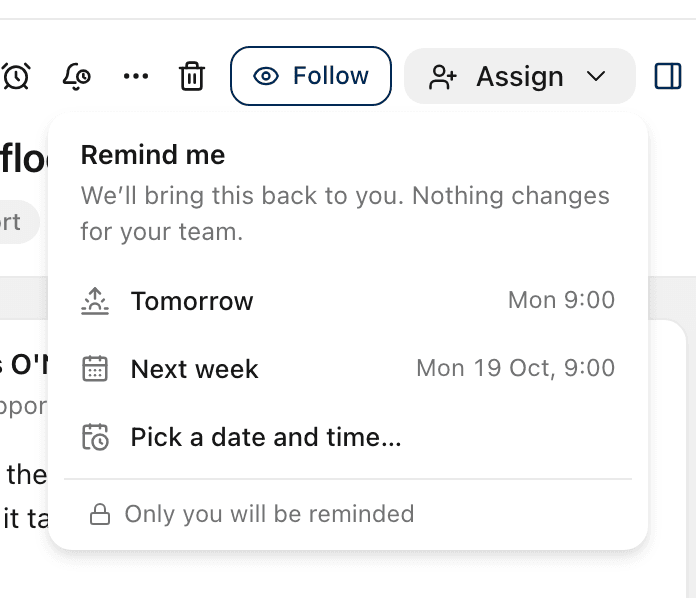
The choices are the same as for snooze: Later today (6 pm, before 5 pm only), Tomorrow (9 am), Next week (9 am Monday), or Pick a date and time….
With Pick a date and time… you can also add a Note to yourself, for example "Check whether the refund landed". A reminder can be at most a year ahead.
When it is due
You get a notification. See The bell.
The conversation shows at the top of Reminders in the sidebar, with the number due beside it.
Under the subject, a chip says Reminder due.
Open the chip or Remind me and select Done to clear it.
See, change or clear a reminder
Before it is due, the chip under the subject shows when you will be reminded. Select it, or Remind me, to:
pick a new time, which replaces the old one
select Clear reminder to remove it
Every conversation you have a reminder on is listed in Reminders, with the time and your note.
You can have one reminder per conversation. You cannot set one on a conversation in Trash.
Related
Was this helpful?
Still stuck?
Email hello@zevinbox.com with what you tried, and the team answers.