Snooze for the team
Hide a conversation for everyone in its inbox until a time you choose, then have it come back open.
Updated 2 min read
Snooze hides a conversation for everyone who can open its inbox, until the time you pick. Then it comes back to the inbox, open. Use it when a conversation cannot move until later, for example while you wait for a delivery date.
Snooze affects the whole team. To be reminded yourself without changing anything for others, use Remind me instead. See Reminders only you see.
Who can snooze
The person the conversation is assigned to.
Owners and admins, on any conversation.
Anyone, on an unassigned conversation, if they take it at the same time. The menu then reads Assign to you and snooze.
If someone else has the conversation, the Snooze button is greyed out for members, and it offers Remind me instead. You cannot snooze a conversation in Trash or Spam.
Snooze a conversation
Open the conversation and select Snooze (the alarm clock).
Choose when it should come back.
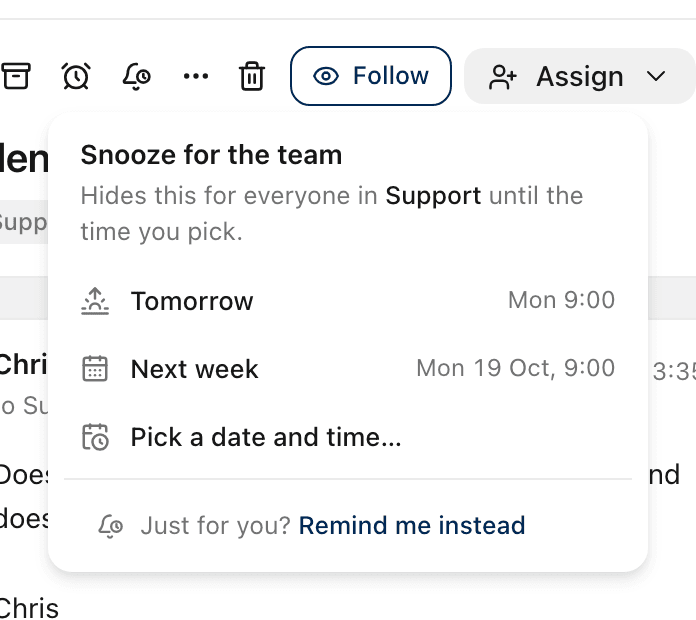
Option | When it comes back |
|---|---|
Later today | 6 pm today. Only offered before 5 pm. |
Tomorrow | 9 am tomorrow |
Next week | 9 am next Monday |
Pick a date and time… | Any time in the next year |
The conversation leaves the list straight away, and a message with Undo appears.
On the phone app the choices are Later today, This evening, Tomorrow, This weekend and Next week. Some are only offered at certain times of day or days of the week. To pick an exact date and time, use the web app.
While it is snoozed
It waits in the inbox's Snoozed tab and in Snoozed in the sidebar.
Its header says until when, and who snoozed it.
If the customer writes again before then, it comes back straight away.
Bring it back early
Open it and select Unsnooze. It comes back now, for everyone in the inbox. Only the assignee, owners and admins can unsnooze.
Related
Was this helpful?
Still stuck?
Email hello@zevinbox.com with what you tried, and the team answers.