View the original message and its SPF, DKIM and DMARC
See a message exactly as it arrived, read its sender checks, copy its headers and download the raw email.
Updated 2 min read
View original shows an incoming message as it arrived: its headers, what the sender checks found, and the raw email to download. It is useful when you need to know where a message really came from, or when someone asks you for the headers.
Open it
Open the conversation.
On the message, open its menu (the three dots, More message actions).
Select View original.
It is only on mail you received, not on messages your team sent. On a quarantined message, only owners and admins see it.
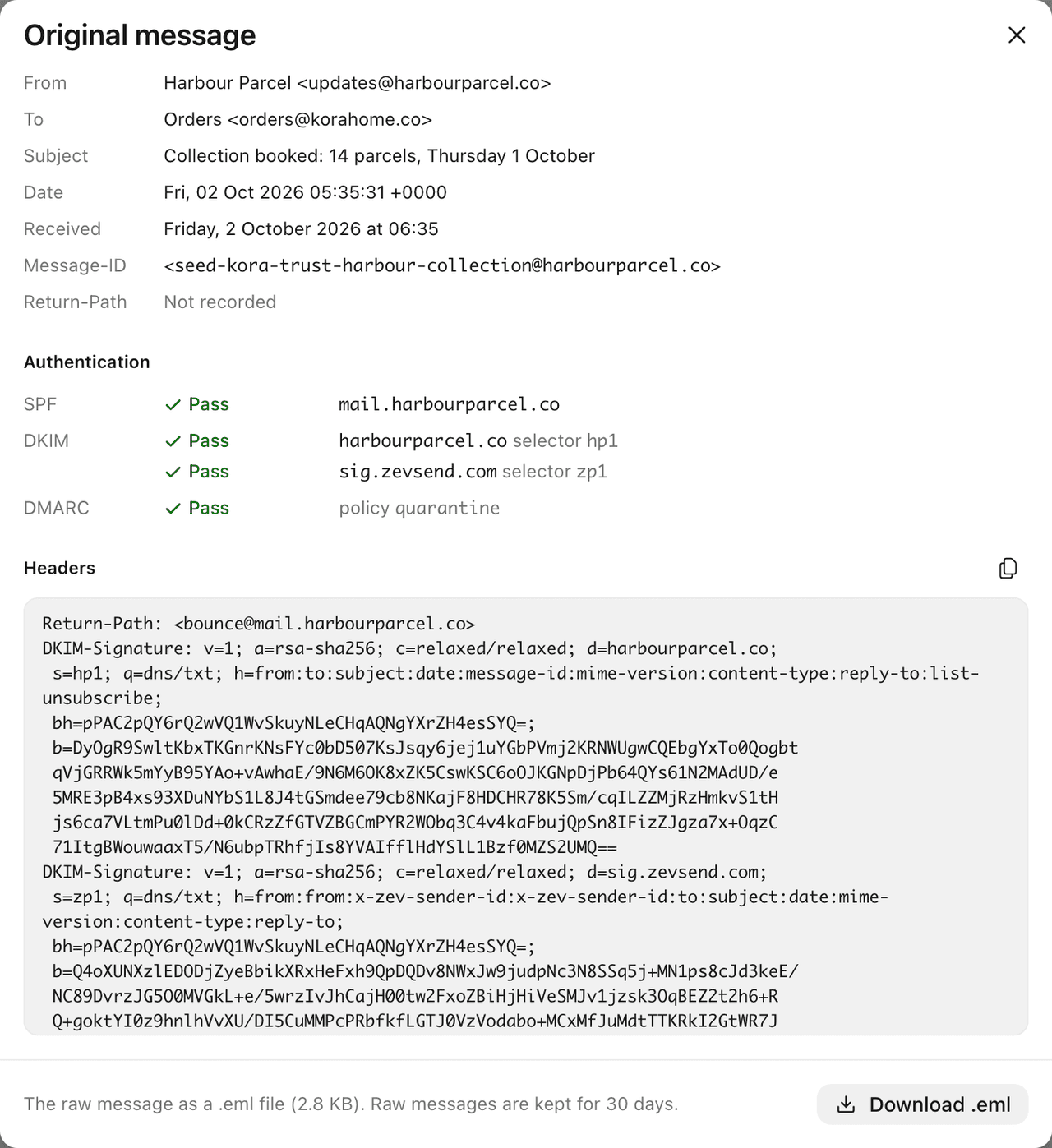
What it shows
Row | Means |
|---|---|
From, To, Cc, Subject | As the message wrote them |
Date | The date the sender's mail program wrote |
Received | When ZevInbox accepted it |
Message-ID | The message's unique id, useful when a mail provider asks for it |
Return-Path | Where bounces for it go |
The sender checks
Under Authentication, three checks say whether the message is really from who it says:
Check | Checks that |
|---|---|
SPF | It was sent from a server the sender's domain allows. |
DKIM | It is signed by a domain, and has not changed since. A message can carry more than one signature. |
DMARC | SPF or DKIM passed for the domain in the From line. Also shows the domain's policy. |
DMARC is the one that matters most. When it fails, ZevInbox can warn you with Failed sender verification on the message. See What the verified sender marks mean.
Each check shows one of: Pass, Fail, Soft fail, Neutral, None, Policy, Temporary error, Permanent error, or Not checked. DKIM can also say Not signed.
These are the same checks your own domain's records pass for the mail your team sends. See The DNS records, one by one.
Headers
Headers shows the message's full header block. Select Copy headers to copy it, for example to send to someone helping you.
Download the raw email
Select Download .eml to save the message exactly as it arrived. Raw messages are kept for 30 days. After that, the dialog says The original is no longer stored.
The download is not available:
For anyone, when a virus was found in the message.
For members, when the message's attachments are blocked. Owners and admins can still download it.
On your phone
View original is on the web. See ZevInbox on your phone.
Related
Was this helpful?
Still stuck?
Email hello@zevinbox.com with what you tried, and the team answers.