Quarantine: review, release or request release
Why ZevInbox holds a dangerous message back, how owners and admins release it, and how members ask for a release.
Updated 2 min read
Some mail is too dangerous to show. ZevInbox quarantines it: the message is kept, but its text, links and attachments are hidden from everyone until an owner or admin releases it.
Why a message is quarantined
Reason | Means |
|---|---|
Virus found | A virus scan found something in it. |
Phishing | A link in it is on a list of known phishing or malware sites, or other phishing checks flagged it. |
Pretends to be from your domain | It claims to come from one of your own domains, but failed sender verification (DMARC). Someone is pretending to be a colleague. |
Dangerous attachment | It carries a program or script, an Office file with macros, or a password-protected archive. |
Trusting a sender never lifts a quarantine.
What you see
A quarantined conversation goes to Spam, marked Quarantined in red. Nobody is notified, and like everything in Spam it is deleted after 30 days there.
The message itself says Content withheld, lists each reason with its detail, and shows any blocked files crossed out.
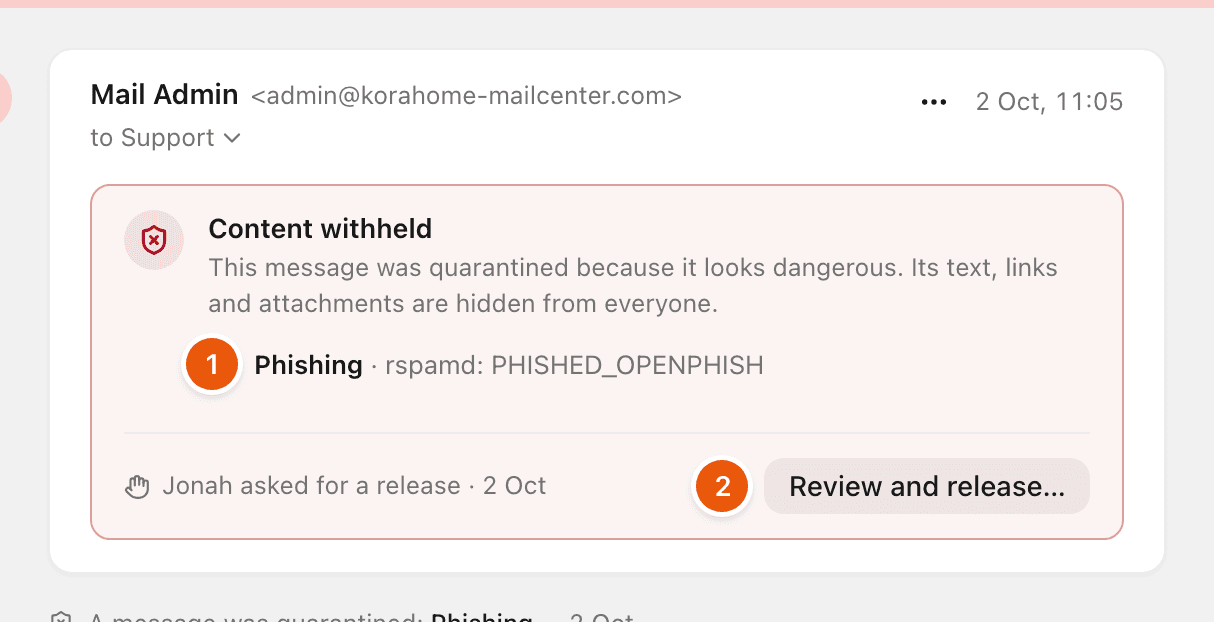
Search finds a quarantined message only by its subject and people, never by what it says.
Release a message
Owners and admins can do this.
Open the conversation from Spam.
Select Review and release… (2).
Read the reasons again. If a teammate asked for the release, it says who.
Decide about the attachments. Allow + the number of attachments releases the files too. Leave it off to make the message readable while its files stay blocked. Only allow them if you trust the sender.
Select Release message, or Release with attachments. To leave it, select Keep in quarantine.
Once released, everyone who can open the inbox can read it and follow its links. The message says Released from quarantine by and who did it. To move the conversation back to the inbox, use Not spam. See Not spam and trusted senders.
Request a release
If you are a member, the message says Only an owner or admin can release it.
Select Request release.
Under Why do you need it?, say why, if you like. For example, that it is an invoice the customer promised.
Select Send request.
Your owners and admins get a notification. The message then says You asked an admin to release it. When anyone has asked, teammates see who asked, so nobody needs to ask twice.
On your phone
Releasing quarantined mail is on the web. See ZevInbox on your phone.
Related
Was this helpful?
Still stuck?
Email hello@zevinbox.com with what you tried, and the team answers.