Mark as spam and block a sender
Move unwanted mail to Spam, block its sender or their whole domain, and how ZevInbox learns from what your team marks.
Updated 3 min read
Anyone who can open a conversation can mark it as spam.
Mark a conversation as spam
Open the conversation.
Open the More actions menu (the three dots) and select Mark as spam…. You can also use Mark as spam… in a message's own menu.
Choose whether to block the sender too.
Select Mark as spam, or Mark as spam & block.
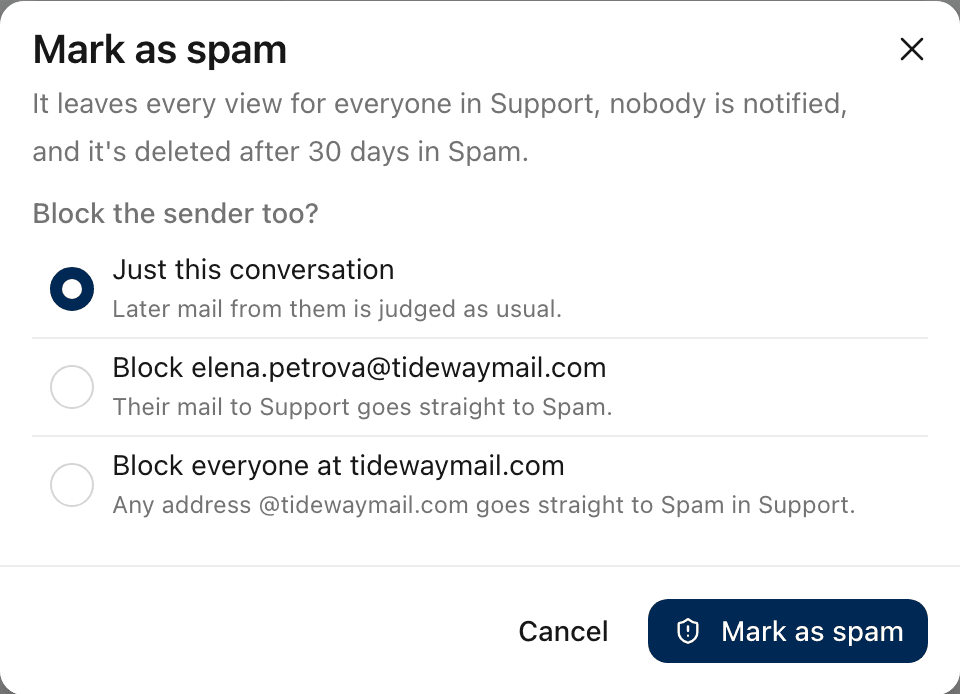
Choice | Does |
|---|---|
Just this conversation | Moves only this conversation. Later mail from them is judged as usual. |
Block + their address | Their mail to this inbox goes straight to Spam from now on. |
Block everyone at + their domain | Any address at that domain goes straight to Spam in this inbox. |
ZevInbox says Moved to Spam, with Undo.
What happens to it
It leaves every view, for everyone in that inbox.
Nobody is notified.
It waits in Spam, in the sidebar, and is deleted after 30 days there. The banner on it says how many days are left.
It cannot be answered while it is in Spam.
To take it back later, open it from Spam and select Not spam. See Not spam and trusted senders.
How blocks work
A block is for one inbox: the inbox the conversation is in.
It blocks the latest sender in the conversation.
Your own organization's domains cannot be blocked, so a colleague's mail never ends up in Spam.
Blocking an address you had trusted stops trusting it.
Even from a blocked sender, dangerous mail is still quarantined. See Quarantine: review, release or request release.
Owners and admins can see and remove blocks in Settings › Inboxes, on the inbox's Sender rules tab. Blocks are only ever added from a conversation.
How ZevInbox learns from it
Spam often comes in waves of near-identical messages. When someone marks a conversation as spam, ZevInbox remembers its latest incoming messages (up to five) by three things:
The sender's address.
The subject, together with the sender's domain.
The message text.
Small differences do not matter: numbers, links, addresses, punctuation and capital letters are ignored. So Case #48213 and Case #77012 count as the same subject.
New mail that matches any of these, in any of your organization's inboxes, is treated as possible spam. It shows the reason Your team marked similar mail as spam.
Some things are never learned:
Very short subjects and messages, which say too little.
The sender and subject of mail from your own domains.
Mail from a trusted sender is never treated as possible spam this way. Selecting Not spam on the conversation makes ZevInbox forget what it learned from it.
Possible spam
ZevInbox's spam filter also marks mail as Possible spam, or Possible phishing when a link's text and its address do not match.
A new conversation that looks like spam goes straight to Spam.
A reply in a conversation you already have stays in the thread, folded away, so one bad message never hides a customer's history. Select Show message to read it, or Not spam to unfold it for good.
Related
Was this helpful?
Still stuck?
Email hello@zevinbox.com with what you tried, and the team answers.