What the verified sender marks mean
The marks beside a sender's name, what each one proves, and the warning on mail that failed sender verification.
Updated 2 min read
A mark beside a sender's name means ZevInbox checked something about that message when it arrived. No mark is not a warning. Most mail has none.
The marks
Mark | Says | Means |
|---|---|---|
Blue check | From + a Zevop product, like From Zevop | Sent by Zevop or one of its products itself. Mail that Zevop's customers send never gets this. |
Blue check | Verified brand | The mail really comes from the brand whose logo you see, by the same standard Gmail and Apple Mail use. |
Navy badge | Verified by ZevSend or Verified by ZevCampaign | That platform checked who the sender is before letting them send. It is about their identity, not an endorsement of what they send. |
Shield | Trusted by + your organization | Someone in your team trusts this sender. Only people in your organization see it. |
Some mail also says Sent via ZevSend in plain text. That means the platform's signature is on the message, but it is not a verified sender. It is a fact, not a mark.
See what was checked
Select a mark, or hover over it, to see What was verified: what was checked on this message, and what it means. On a phone, it opens from the bottom of the screen.
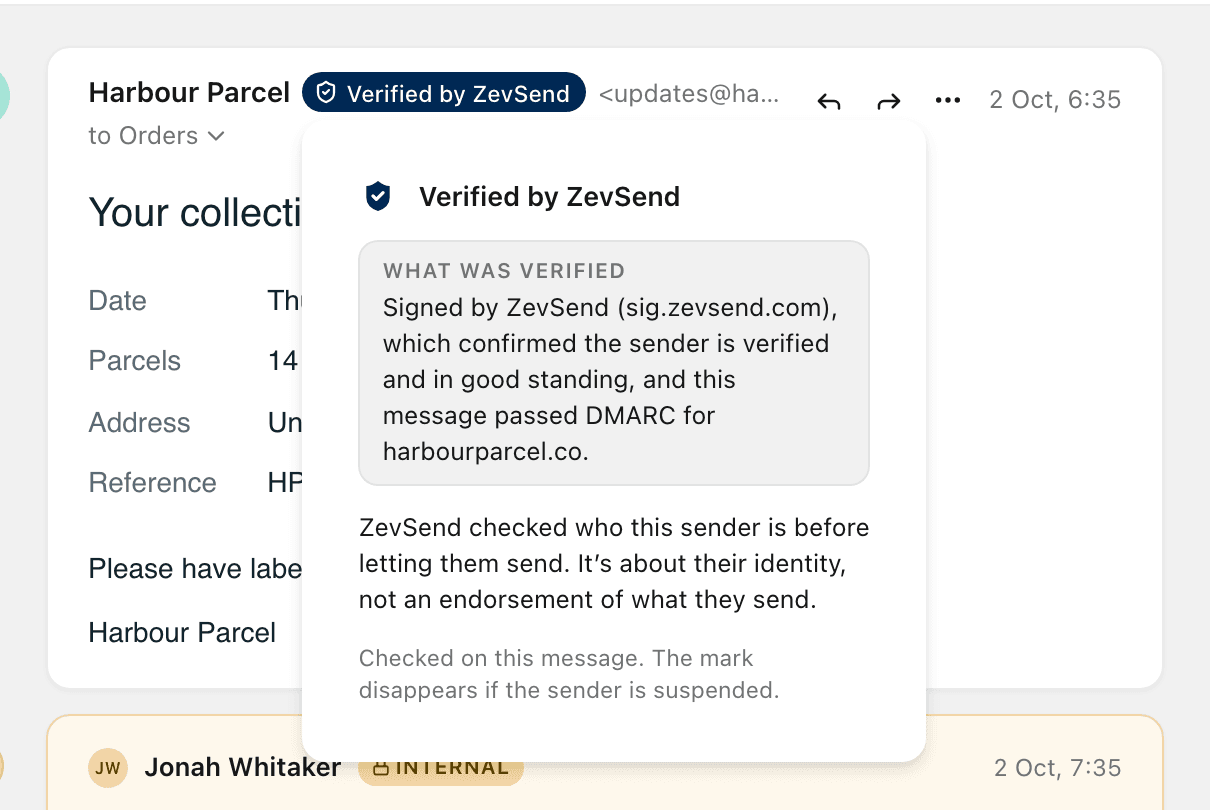
Each mark is checked on that message alone. A sender who has it on one message does not get it on a message that fails the checks.
Failed sender verification
When a message says it is from a domain, but that domain's own check (DMARC) says it is not, ZevInbox warns you on the message:
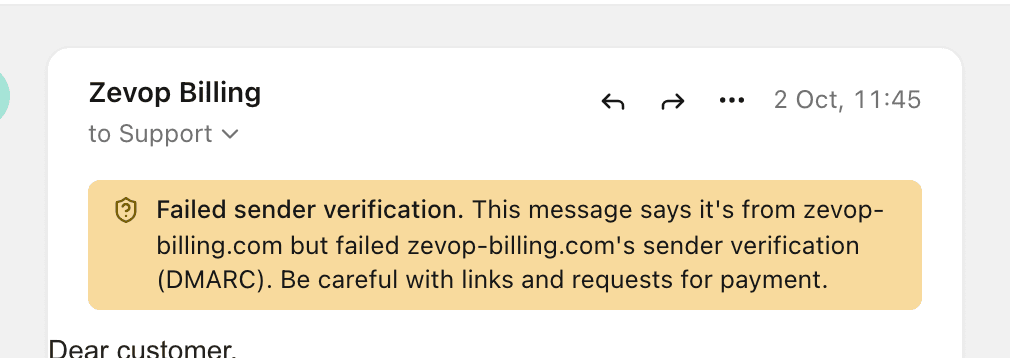
Treat it as a likely fake. Do not follow its links or pay anything it asks for. Check with the real company another way.
More detail on a message
Select the recipients line under the sender's name (for example to Support) to see the message details. Its Security line says whether the message passed sender verification (DMARC) and for which domain. Mailed-by and Signed-by show which domains sent and signed it.
For everything, see View the original message and its SPF, DKIM and DMARC.
Related
Was this helpful?
Still stuck?
Email hello@zevinbox.com with what you tried, and the team answers.