Not spam and trusted senders
Bring a conversation back from Spam, trust a sender so their mail always arrives, and manage blocked and trusted senders.
Updated 2 min read
Anyone who can open a conversation can mark it as not spam.
Bring a conversation back
Open Spam in the sidebar and open the conversation. The banner says In Spam, and why, when the spam filter put it there.
Select Not spam on the banner. You can also use Not spam… in the More actions menu.
Tick Trust + the sender's address if you want their mail to always arrive. See below.
Select Not spam.
The conversation goes back to its inbox, open, for everyone.
A message folded away as Possible spam inside a normal conversation has a Not spam button too. It unfolds the message for good.
Marking a conversation as not spam also makes ZevInbox forget what it learned when it was marked as spam. The next message like it arrives normally. See Mark as spam and block a sender.
Trust a sender
Trusting a sender is for one address, in one inbox. From then on:
Their mail always reaches the inbox. The spam filter does not move it to Spam.
Their images load straight away. See Hidden images and link checks.
Their messages show the Trusted mark beside their name, but only when the message passed sender verification. Someone faking their address never gets it. See What the verified sender marks mean.
Trust has limits, on purpose:
Dangerous mail from them is still quarantined.
A link whose text and address do not match is still flagged, unless the message passed sender verification.
Trusting an address that was blocked removes the block.
See and change blocked and trusted senders
Owners and admins can do this.
Go to Settings › Inboxes and open the inbox.
Open the Sender rules tab.
Choose Blocked or Trusted in the list menu. Search by address or domain if the list is long.
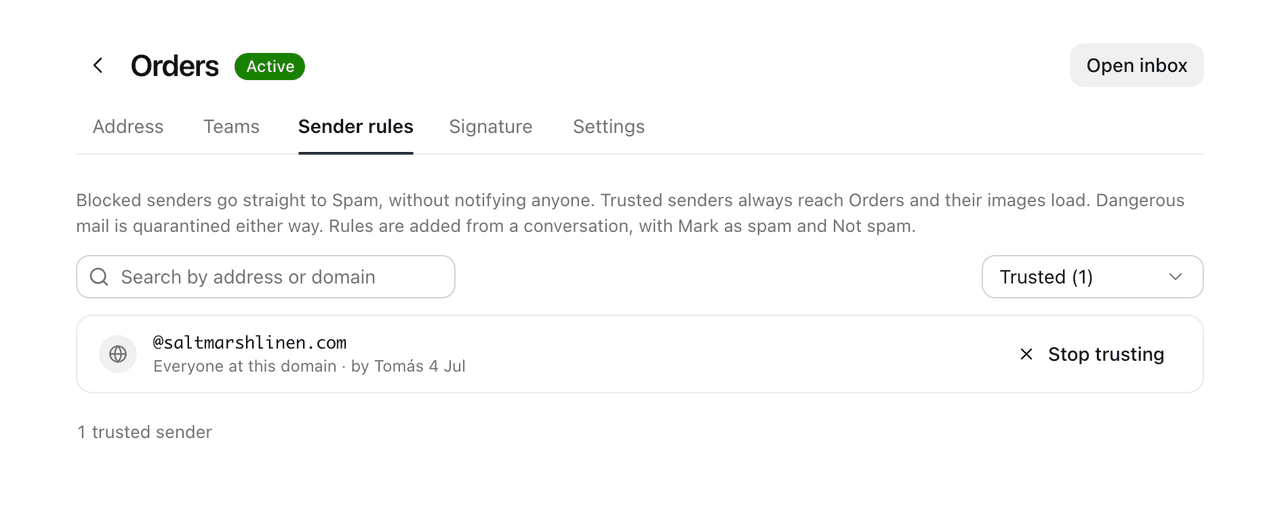
Each entry says whether it is This address or Everyone at this domain, who added it and when.
Select | Does |
|---|---|
Unblock | Their mail is judged as usual again. |
Stop trusting | Their mail is checked for spam as usual again. |
Rules are only added from a conversation: blocks with Mark as spam, trust with Not spam.
Related
Was this helpful?
Still stuck?
Email hello@zevinbox.com with what you tried, and the team answers.