Plans and their limits
The three plans, their prices and limits, what counts toward each limit, and what happens when you reach one.
Updated 2 min read
Each plan is one flat price for the whole organization, not a price per person. Every plan has every feature. Plans differ only in their limits.
The plans
Starter | Team | Business | |
|---|---|---|---|
Who it is for | One or two people sharing one address | A support or sales team | Several departments, each with its own inboxes |
Monthly | NGN 2,500 a month | NGN 10,000 a month | NGN 30,000 a month |
Annual | NGN 25,000 a year | NGN 100,000 a year | NGN 300,000 a year |
Members | 3 | 10 | 40 |
Teams | 1 | 5 | 20 |
Inboxes | 2 | 10 | 40 |
Custom domains | 1 | 3 | 10 |
Outgoing emails a month | 1,500 | 10,000 | 40,000 |
Prices are in Nigerian naira, plus VAT. VAT is added on the invoice as its own line. A year costs the same as 10 months.
Your organization's currency is set when it is created and cannot be changed.
Need more than Business allows? Email hello@zevinbox.com.
What counts
Limit | What is counted |
|---|---|
Members | People in the organization, plus invitations not yet accepted. An expired invitation does not count. |
Teams | Every team. |
Inboxes | Every inbox. |
Custom domains | Every domain you have added, verified or not. |
Outgoing emails | Each recipient of each message you send, once. A reply to three people counts as three. Incoming mail does not count. |
The outgoing email count resets at the start of each calendar month.
See your usage
Owners and admins see their plan in Settings › Billing.
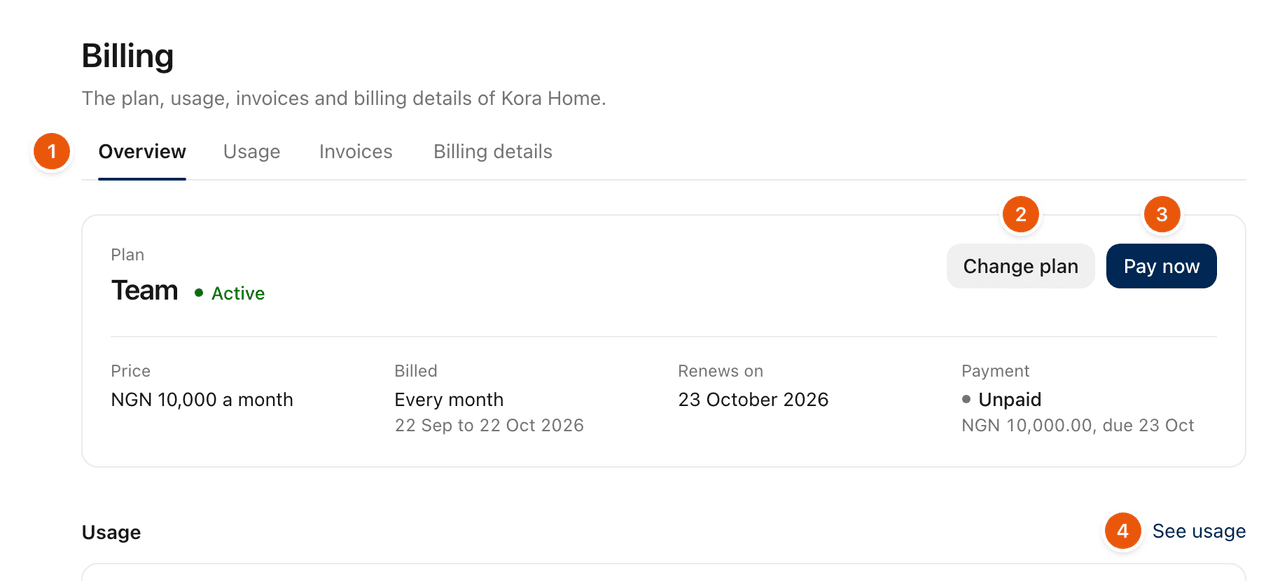
How much of each limit is in use is in Settings › Billing › Usage. The Overview tab shows a short version. Emails sent this month says how many are left and when the count resets.
When you reach a limit
Members: no one else can be invited until a member is removed or an invitation is revoked.
Teams and Inboxes: no more can be created until one is deleted.
Custom domains: no more can be added until one is removed.
Outgoing emails: nothing more can be sent until the count resets. A message to more recipients than you have left is not sent. Nothing is ever billed past the limit.
Owners and admins are told in the bell and by email when the organization has used 80% of its outgoing emails, and again at 100%.
To raise a limit, an owner can move to a larger plan. See Change or cancel your plan.
During the 14-day trial, the limits are the Team plan's, and sending is capped at 300 emails a month. See How the trial works.
Related
Was this helpful?
Still stuck?
Email hello@zevinbox.com with what you tried, and the team answers.