Invite your team
Send invitations, choose roles and teams, and manage pending invitations.
Updated 1 min read
Owners and admins can invite people. Invitations are sent by ZevID, the sign-in every Zevop product uses.
Send an invitation
Go to Settings › Members.
Select Invite people.
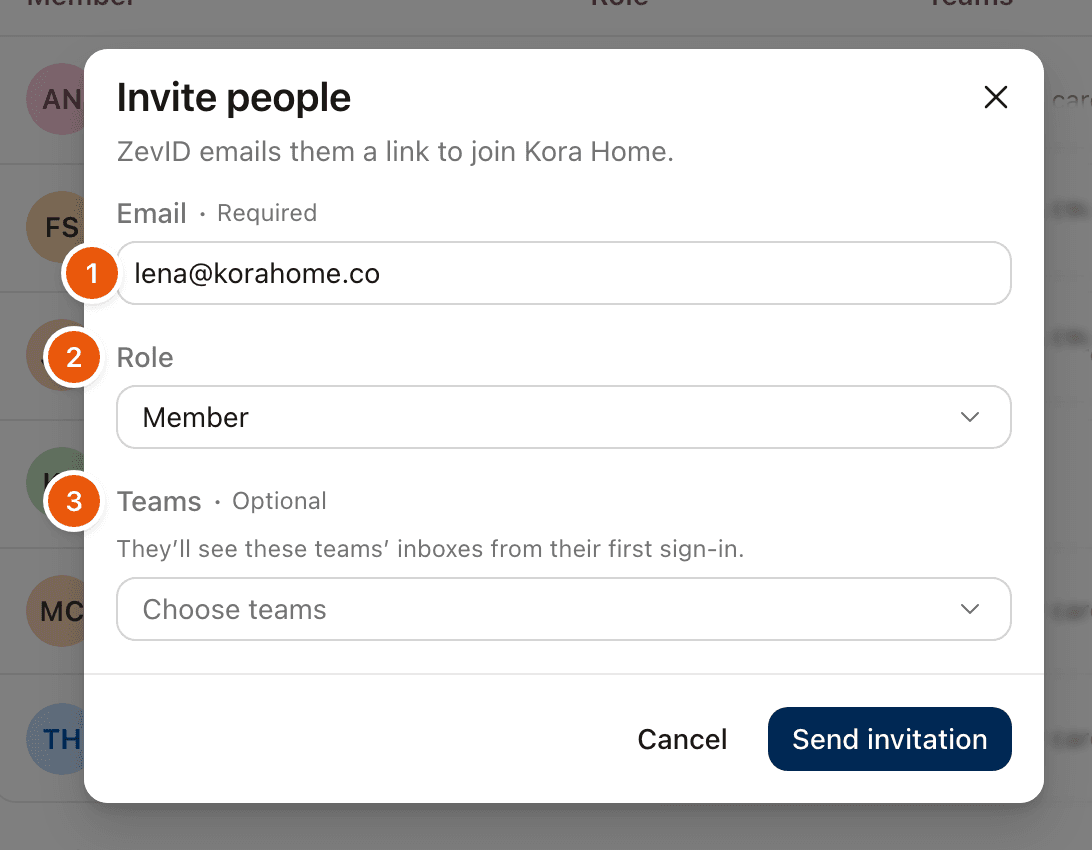
Enter their email address, choose a role and, if you like, the teams they join.
Select Send invitation.
Roles
Member works in the inboxes of their teams.
Admin manages members, teams and inboxes.
Owner has full control, including billing and other owners. Only an owner sees this option.
Teams are optional. If you choose some, the person sees those teams' inboxes from their first sign-in. You can add them to teams later too.
What they receive
They get an email with a link to join. If they do not have a ZevID yet, they create one when they open it. An invitation is valid for 7 days.
If they sign in with a different account from the one you invited, ZevInbox tells them the invitation is for another account and offers to switch.
Pending invitations
Go to Settings › Members › Invitations to see who has not joined yet. From there you can Resend an invitation or Revoke it.
Was this helpful?
Still stuck?
Email hello@zevinbox.com with what you tried, and the team answers.