Keyboard shortcuts
Every shortcut in ZevInbox on the web. Press ? to see them in the app.
Updated 1 min read
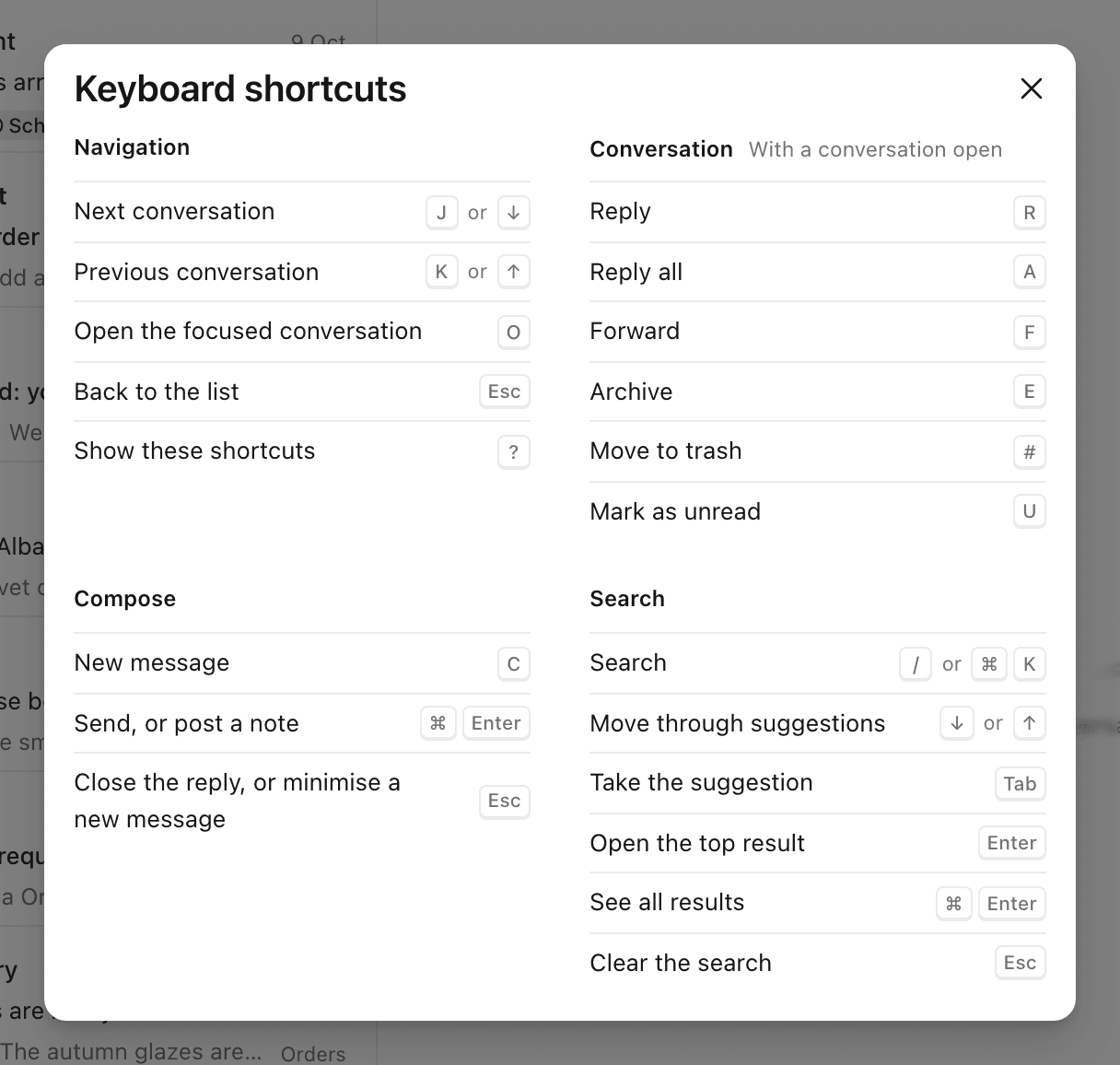
Press ? anywhere in ZevInbox to see this list. You can also open it from your name in the top right, then Keyboard shortcuts.
On a Mac, ⌘ is the Command key. On Windows and Linux, use Ctrl instead.
Moving around
Keys | What it does |
|---|---|
| Next conversation |
| Previous conversation |
| Open the focused conversation |
| Back to the list |
| Show the shortcuts |
With a conversation open
Keys | What it does |
|---|---|
| Reply |
| Reply all |
| Forward |
| Archive |
| Move to trash |
| Mark as unread |
Writing
Keys | What it does |
|---|---|
| New message |
| Send, or post a note |
| Close the reply, or minimise a new message |
Search
Keys | What it does |
|---|---|
| Search |
| Move through suggestions |
| Take the suggestion |
| Open the top result |
| See all results |
| Clear the search |
Was this helpful?
1 of 1 found this helpful.
Still stuck?
Email hello@zevinbox.com with what you tried, and the team answers.